Science Says
Email Time Blocking Doesn’t Work (Here’s Why)

Transcript:
Let me guess. You’ve tried the email time block, you picked your two windows a day, you closed the tab in between, and you felt SO organized. And then Thursday happened, and somehow you were in your inbox for half the freaking day, your actual work never got touched, and by Friday night, you were checking email in bed.
And before you blame your discipline, researchers have actually tested email batching, and what they found is not what the productivity advice keeps promising. By the end of this post, you’re going to have all six rules of what I call the Triage-and-Route System, and you’ll collect them as we go. The first one lands fast, so we’re almost there already. Each one comes with the science for why it works, because the why is what makes it stick.
If we haven’t met yet, hi, I’m Jenae. I run Productivity Stacks, where we dig into the actual science behind productivity advice for freelancers and small business owners. There’s a free download, the Email Triage and Route Kit, if you want the action steps right now. But stick with me to get all of the steps and the science behind them to really make it stick.
Why the Email Time Block Keeps Collapsing
So why does the email time block keep collapsing? Well, it’s because email is not one kind of task. One message can take a single second. You read the subject line, spam, delete. The next one is a quote request that needs prep, numbers, maybe input from somebody else. That’s a multi-day project hiding behind an email to-do task.
A time block is one container, one shape. Email delivers packages of every size all day long, so of course they don’t fit.
And the research backs this up. In one study that tracked workers with computer logs and biosensors, batching was not significantly associated with lower stress, despite all the claims out there, and the productivity findings depended on how much time people spent on email overall. Another team tested batching inside a real company. It helped at first, but the benefits faded within about two weeks, meaning the thing that did hold up was checking less often. In a randomized experiment, limiting email checks to three times a day lowered people’s daily stress.
So what does all this mean? It means keep the block, but give it a completely different job.
Rule 1: Sort, Don’t Solve
Your email block is a TRIAGE block. Its only output is decisions. You’re not writing essays in that block.
And we’re gonna calibrate the dose. In my coaching practice, over-batching is real. Let the pile get big enough and opening it becomes its own project, so you avoid it, and now the pile is even bigger. But everybody’s different. My husband, for example, batches laundry every few weeks, multiple loads, totally happy with it. I do mine weekly because his version would absolutely bury me. Same chore, different right answer.
Research on email backs that bigger idea. People whose email use strays from what they actually want, in either direction, also report more sources of stress at work.
One to three triage blocks a day, or for some of us, per week even. And the right number is the one where opening it doesn’t make you flinch or overwhelm you.
Your Inbox Is a Slot Machine
But rule one has a problem. Have you ever caught yourself checking email between blocks even when you know better, even when you set those blocks up yourself?
That’s because your inbox is actually a feed. Research on checking habits shows they’re built and reinforced by quick little informational rewards, and the unpredictable timing is the same mechanism that makes slot machines work.
Now, you probably already know that social media is built this way on purpose. Email wasn’t. Nobody sat down and engineered your inbox to hook you, but in today’s world, it ends up having the exact same effect, because every refresh can hand you nothing or a new client or a complaint. Neutral, happy, upsetting. You never know which, and that uncertainty is exactly what keeps your brain pulling the lever. Early research on smartphones even hints that we may reach for our phones more when we’re stressed, like a little self-soothing ritual. And I’d bet for a lot of us, that reach includes hitting refresh on our email app, whether it’s on the smartphone or a browser tab.
I can say all this because I was a chronic refresher myself. Refresh, nothing new. Oh, tiny hit of relief. Feel a little productive. Repeat. Until the day the refresh delivers the angry client email or the bad news, and now that thing owns your whole afternoon during time that you didn’t plan to give it. That was not part of your time block. You didn’t say, “Be upset for the next three hours.”
Now I’ll be fully transparent. To this day, I use an app blocker on my email outside of working hours. Current me, not past me. Willpower was never going to win against a machine that behaves like a casino, so I stopped asking it to.
But you can’t just block the lever if something truly urgent has nowhere to go. Sometimes there really are urgent things that we need to handle.
Rule 2: Build the Escape Valve
So here’s what you do. Put your check times in your email signature, not just the auto-reply, the signature, and also your auto-reply, so people know when to expect a response. And give them an urgent ripcord for the truly on-fire stuff.
Mine is a separate urgent-only email address that DOES notify my phone and skips my app blocker. I like it better than phone calls because I still get the context in writing. And let’s be real, with as many spam calls as so many of us get these days, I’m not answering my phone anyway.
My exact setup for all of this, the apps, the addresses, the notification settings, is in that Kit. Once you’ve set that up and urgent has its own door, that refresh between blocks loses its excuse, and you can finally let it go.
Real Quickitis
But wait, there’s another trap, and I’ve named it with my coaching clients. I call it real quickitis. That’s what we come down with when we get a belief that a reply or something we do is gonna take just a few seconds… and then you surface an hour later.
Psychologists have a name for this, and it’s called the planning fallacy. People reliably underestimate how long their own tasks are gonna take. And even when your estimate is right, 10 seconds times 100 emails is no longer 10 seconds.
There’s also a sneakier version that I watch happen with clients constantly. You reply fast, and they reply faster, and suddenly you’re having a DM conversation by email. Every instant reply trains the other person to expect the next one.
Rule 3: The Ten-Second Rule
If a reply is truly 10 seconds, a “got it, thanks,” a yes or no, okay, send it. But the moment that you catch yourself composing, stop. That’s now a task, and tasks don’t live in the inbox. Where they do live is coming up next.
Rule 4: The Cadence Rule
One reply per thread per block, even if they answer instantly. You’re not being slow, you’re teaching people your rhythm.
Your Inbox Is an Archive
Last piece, and it’s my favorite finding in this whole post. Your inbox, guys, is an archive. It’s a record of conversations. The trouble starts when we also use it as a to-do list, because then every glance reopens every unfinished thing in there.
Research suggests that when something pulls you away from unfinished work, part of your brain stays stuck on it. Researchers call this attention residue, and it gets especially sticky when you know that you’re gonna be coming back to that task under time pressure. And here’s the good news from the same paper. In two experiments, taking a moment to write a brief plan for how you’re gonna pick that task back up significantly reduced that residue, and performance on the next task stopped suffering.
One honest note: they didn’t test whether the plan helps you finish the original task later. But that attention residue is what hurts the task that comes after it, and letting go cleanly is exactly the job that we’re hiring it for.
Rule 5: Route With the Link
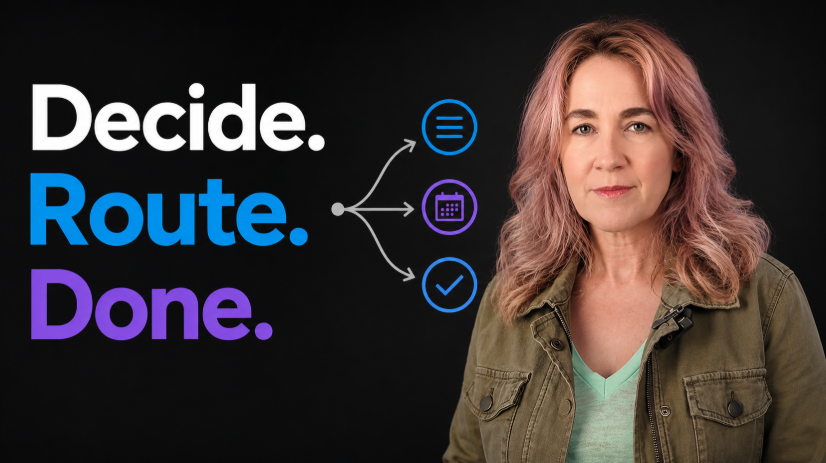
Anything bigger than 10 seconds goes into your task system. For me, it’s ClickUp, with the email thread hyperlink pasted right in and one line on the next action. That one line IS the plan from the research that we just talked about. When a sponsor emails me about the newsletter, the thread link goes into ClickUp with a note on the next step. Sometimes I even email them from inside ClickUp, so replies land right on the task.
Rule 6: Schedule the Big Ones
30-minute-plus items get a calendar block. The calendar event links to the task. The task links to the thread. See how that works? You do the work without ever opening the inbox, so that slot machine never gets a turn with your brain.
The Full System
So there you have it, the Triage-and-Route System. Rule one, sort don’t solve. Rule two, build the escape valve. Rule three, the ten-second rule. Rule four, the cadence rule. Rule five, route with the link. Rule six, schedule the big ones.
All six rules are in the free Email Triage and Route Kit, plus something that’s not in the video at all: the exact way my email is set up, from personal to work, apps, urgency, notifications, the whole machine.
And that’s how this chronic refresher who needed an app blocker doesn’t ever rely on refresh anymore. And honestly, it’s because there’s nothing left to decide in there. Anything urgent has its own door. Everything else has an appointment.
Email was built to deliver your work, and somewhere along the way we let it start scheduling our days… and it was never really built for that.
So tell me in the comments, I know I’m not alone in this: what’s the longest a “real quick” email has ever taken you? Let’s share. I read every single one.
If you found this helpful, sign up for our newsletter here to get more content like this delivered straight to your inbox.
Science Notes
The content we produce lean on published research, so it’s only fair to show you the cracks too. No study is perfect, and pretending otherwise is exactly how productivity advice gets oversold. Here’s what the studies behind this video can tell us, and where the evidence stops.
On the ready-to-resume plan (Leroy & Glomb, 2018). The intervention was tested in two lab experiments. Participants wrote a brief plan for returning to an interrupted task, let it go, and performed better on the next thing. What the researchers never tested is whether the plan helps you finish the original task once you come back to it. Our system uses the plan for the letting-go part, which is the tested part… but you deserve to know where the evidence ends. One more nuance: the experiments studied being interrupted by an external demand, and the authors note that self-initiated breaks may work differently. Routing an email is a choice rather than an interruption, so applying the plan there is our practical judgment call, not something the study tested directly.
On batching and stress (Mark et al., 2016). An observational study of 40 information workers. In that sample, batching was not significantly associated with lower stress, and the productivity findings depended on how much time people spent in email overall. Small sample, one workplace context.
On batching wearing off (Wijngaards et al., 2022). One company, quasi-experimental design, so no random assignment. The benefits faded within about two weeks, and batching helped most for people with heavy email volume who weren’t expected to reply instantly. One more crack worth knowing: high-volume emailers were also the most likely to drop out of the study entirely, so that subgroup finding rests on the people who stayed. Your mileage will vary… which is kind of the point of the whole video.
On checking email less (Kushlev & Dunn, 2015). A randomized experiment, one week per condition, 124 people. Limiting checks to three times a day lowered daily stress with a small-to-moderate effect size (Cohen’s d = .37). A week is a week, though. Longer-term effects weren’t measured.
On email “fit” (Stich et al., 2019). A survey of 118 working adults measuring workplace stressors, meaning the parts of work people rate as stressful, like job control and work relationships. It supports one specific idea we use: people whose email use strays from what they actually want, in either direction, also report higher levels of those stressors. It does NOT test over-batching. Over-batching is my coaching observation, and so is the idea that instant replies train people to expect more instant replies. I see both constantly with clients, and I want to be clear that neither comes from a study.
On stress and reaching for our phones (Qi et al., 2025). A single study about smartphones in general rather than email, with a correlational daily-tracking design. That’s why the video says “early research hints.” And the leap from phones in general to refreshing email specifically is our observation, not something the study measured.
On the slot machine mechanism (Clark & Zack, 2023). A theoretical review applying decades of gambling research to digital products. One disclosure the authors themselves make: Clark’s research centre receives funding from the British Columbia Lottery Corporation, which the authors state had no role in the paper.
The two remaining citations (Buehler et al., 1994, on the planning fallacy, and Oulasvirta et al., 2011, on checking habits) provide the foundational work on these concepts, and the video uses them for modest claims. Worth noting on Buehler: the studied tasks were things like school assignments and personal projects rather than email replies, so applying the underestimation mechanism to the inbox is our translation of the research, not something the original experiments tested.
Sources
- Mark, G., Iqbal, S. T., Czerwinski, M., Johns, P., Sano, A., & Lutchyn, Y. (2016). Email duration, batching and self-interruption: Patterns of email use on productivity and stress. Proceedings of the 2016 CHI Conference on Human Factors in Computing Systems, 1717–1728. https://doi.org/10.1145/2858036.2858262
- Wijngaards, I., Pronk, F. R., & Burger, M. J. (2022). For whom and under what circumstances does email message batching work? Internet Interventions, 27, 100494. https://doi.org/10.1016/j.invent.2022.100494
- Kushlev, K., & Dunn, E. W. (2015). Checking email less frequently reduces stress. Computers in Human Behavior, 43, 220–228. https://doi.org/10.1016/j.chb.2014.11.005
- Stich, J.-F., Tarafdar, M., Stacey, P., & Cooper, C. L. (2019). Appraisal of email use as a source of workplace stress: A person-environment fit approach. Journal of the Association for Information Systems, 20(2), 132–160. https://doi.org/10.17705/1jais.00531
- Oulasvirta, A., Rattenbury, T., Ma, L., & Raita, E. (2012). Habits make smartphone use more pervasive. Personal and Ubiquitous Computing, 16(1), 105–114. https://doi.org/10.1007/s00779-011-0412-2
- Clark, L., & Zack, M. (2023). Engineered highs: Reward variability and frequency as potential prerequisites of behavioural addiction. Addictive Behaviors, 140, 107626. https://doi.org/10.1016/j.addbeh.2023.107626
- Qi, H., et al. (2025). Dysfunctional reward processing amplifies stress-related smartphone overuse: Evidence from ERPs and ecological momentary assessment. Journal of Behavioral Addictions, 14(3), 1429–1443. https://doi.org/10.1556/2006.2025.00066
- Buehler, R., Griffin, D., & Ross, M. (1994). Exploring the “planning fallacy”: Why people underestimate their task completion times. Journal of Personality and Social Psychology, 67(3), 366–381. https://doi.org/10.1037/0022-3514.67.3.366
- Leroy, S., & Glomb, T. M. (2018). Tasks interrupted: How anticipating time pressure on resumption of an interrupted task causes attention residue and low performance on interrupting tasks and how a “ready-to-resume” plan mitigates the effects. Organization Science, 29(3), 380–397. https://doi.org/10.1287/orsc.2017.1184